
Focused Operator Capabilities
Install the workflows your operator needs.
Start with one useful operator. Add support, research, content, finance, and browser workflows as the system proves itself.
Workflow Map
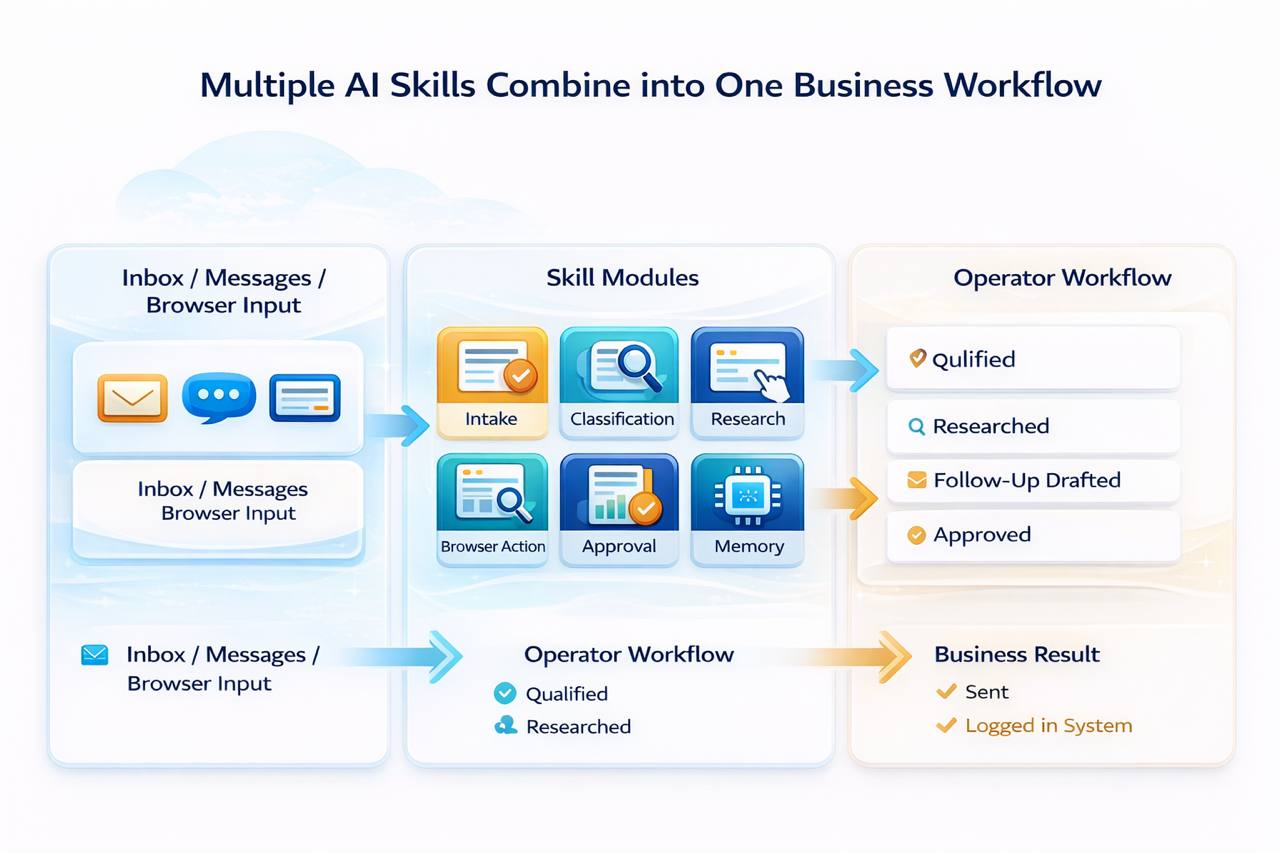
See how skills stack into one workflow.
Skills are useful because they connect into one operator flow, not because they sit in isolation like plugins.
Skill Library
Choose workflows that match your team.
You do not need every capability on day one. Pick the work you want to delegate now, then expand once the operating model is established.
🏢 Business 
🎧
Customer Service Agent
Business
Handles support tickets, answers FAQs, and escalates complex issues through the channels your team already uses.
- Auto-replies to common questions
- Escalates when a human is needed
- Works across Telegram, email, and Discord
- Keeps your response pattern consistent
📤
Sales Outreach Agent
Business
Researches leads, drafts personalized outreach, and runs follow-up cadence without turning your team into a spreadsheet factory.
- Lead research and qualification
- Personalized outreach drafts
- Follow-up reminders and sequencing
- CRM handoff support
📝
Meeting Summarizer
Business
Turns calls into clean summaries, action items, and follow-up notes that actually get delivered back into the workflow.
- Meeting notes and summary
- Action items with owners
- Delivered by Telegram or email
- Fits Zoom and Meet workflows
🧾
Invoice & Contract Monitor
Business
Watches inbound documents, flags odd amounts or dates, and keeps deadlines visible before money or paperwork slips.
- Invoice scanning
- Due date reminders
- Exception alerts
- Export to sheets
📊 Research & Intelligence 
☀️
Daily Brief Agent
Research & Intelligence
Delivers a tailored morning briefing with calendar, news, weather, markets, and the highest-priority items for the day.
- Scheduled delivery
- Calendar context
- News and market summary
- Telegram or email output
🕵️
Competitor Intel Agent
Research & Intelligence
Tracks competitor moves, pricing, product pages, and hiring signals so your team sees movement early instead of after the fact.
- Monitor key competitors
- Pricing and page change alerts
- Digest major moves
- Weekly summary output
📣
Reddit Growth Agent
Research & Intelligence
Surfaces relevant threads, drafts replies, and helps your team participate with more consistency and less manual searching.
- Finds relevant threads
- Drafts organic replies
- Manual approval path
- Tracks engagement
📊
Market Research Agent
Research & Intelligence
Collects public data, summarizes patterns, and exports structured research when a team needs answers faster than manual digging allows.
- Research collection
- Trend synthesis
- Export to Sheets or Notion
- Recurring report option
🎬 Content & Media 
🎬
Video Editor Agent
Content & Media
Turns long recordings into usable clips, captions, and ready-to-post cuts so production teams can move faster.
- Clip detection
- Caption support
- Short-form formatting
- Batch-friendly workflow
📆
Social Media Manager
Content & Media
Drafts, schedules, and coordinates content across channels without forcing the team to rebuild the process every week.
- Cross-platform scheduling
- Platform-specific copy
- Image support
- Basic analytics loop
✍️
Newsletter Writer
Content & Media
Researches a topic, drafts the issue, and moves it toward publish-ready form in a repeatable editorial workflow.
- Topic research
- Draft generation
- Publishing workflow support
- Voice consistency
🔍
SEO Blog Writer
Content & Media
Finds content opportunities and generates structured drafts built for organic visibility instead of generic content spam.
- Keyword support
- Long-form drafting
- Internal linking help
- CMS-ready handoff
⚙️ Technical 
👾
Code Review Agent
Technical
Reviews pull requests for bugs, regressions, and risky changes before they become somebody else’s production headache.
- PR review support
- Regression checks
- Security flags
- Inline review comments
🛡️
Database Monitor
Technical
Flags slow queries, unusual patterns, and health issues so database problems are surfaced early and clearly.
- Query watch
- Anomaly alerts
- Performance summaries
- Works across major SQL stacks
🧠
Memory Agent
Technical
Adds long-term recall so the operator keeps preferences, prior context, and decisions instead of starting from zero each time.
- Persistent memory
- Cross-session recall
- Relevance search
- Context continuity
🌐
Browser Automation Agent
Technical
Handles websites, forms, data extraction, and browser-driven workflows when APIs alone are not enough.
- Form completion
- Website interaction
- Data extraction
- Scheduled or on-demand runs
Bundle Options
Bundle when the footprint grows.
The bundle structure is simple on purpose: prove one use case, then consolidate into a larger pack when the operator is taking on more real work.
Single Skill
Any 1 skill of your choice
$39
One-time purchase. Lifetime access tied to the deployment.
- Installed within 24 hours
- Setup guide included
- Lifetime access
- Support available
Starter Pack
Any 3 skills
$99 $117
One-time purchase. Lifetime access tied to the deployment.
- Installed within 24 hours
- Setup guide included
- Lifetime access
- Support available
Power Pack
Any 6 skills
$169 $234
One-time purchase. Lifetime access tied to the deployment.
- Installed within 24 hours
- Setup guide included
- Lifetime access
- Priority support path
Full Suite
All 16 skills
$249 $624
One-time purchase. Lifetime access tied to the deployment.
- Installed within 24 hours
- Setup guide included
- Lifetime access
- Priority support path
- Best fit for heavier operators
Install Flow
Simple purchase. Clean install.
Choose the work you want automated
Pick the operator capabilities that match the workflows your team actually needs right now instead of buying everything at once.
We install them into your deployment
Each skill is configured against your channels, access model, and workflow expectations so it behaves like part of the system, not a bolt-on demo.
Run, refine, and add more later
As new use cases show up, add more skills or bundle into a larger pack without rebuilding the whole deployment from scratch.
Treat skills like operator roles, not app-store clutter.
The strongest path is usually one deployment plus two or three high-value workflows. Buy the skills that remove a real bottleneck first, then expand after the team is using the system.
- Start with support, reporting, or browser execution if those are already painful.
- Use bundle pricing when the operator is moving beyond one narrow job.
- Keep custom work for cases where the packaged skill set is almost right, but not fully right.
Can I add skills after the deployment is live?
Yes. Skills can be added after the base deployment is running, which lets teams start lean and expand only when there is a real workflow to support.
Are these one-time purchases?
Yes. Skills are positioned as one-time purchases tied to the deployment, not another recurring fee stack on top of the base plan.
Do all skills work on every deployment model?
Most skills work across cloud, ship-in, and on-site. A few higher-resource workflows may be better suited for cloud or on-site, depending on what they need to execute well.
What if we need something more specific?
Custom skill work is available when the packaged set does not fully match the workflow. The right approach is to prove the baseline first, then scope custom work around a known operating pattern.
Next step
Start the base deployment first.
That keeps the purchase simple, the rollout cleaner, and the system easier to prove inside a real operating environment.