The cloud plans cover the hosted OpenClaw deployment footprint and the onboarding path for getting the system live. Credits and custom implementation work are handled separately so they scale with usage instead of being buried inside the base plan.
Pricing & deployment paths
Choose the right OpenClaw rollout.
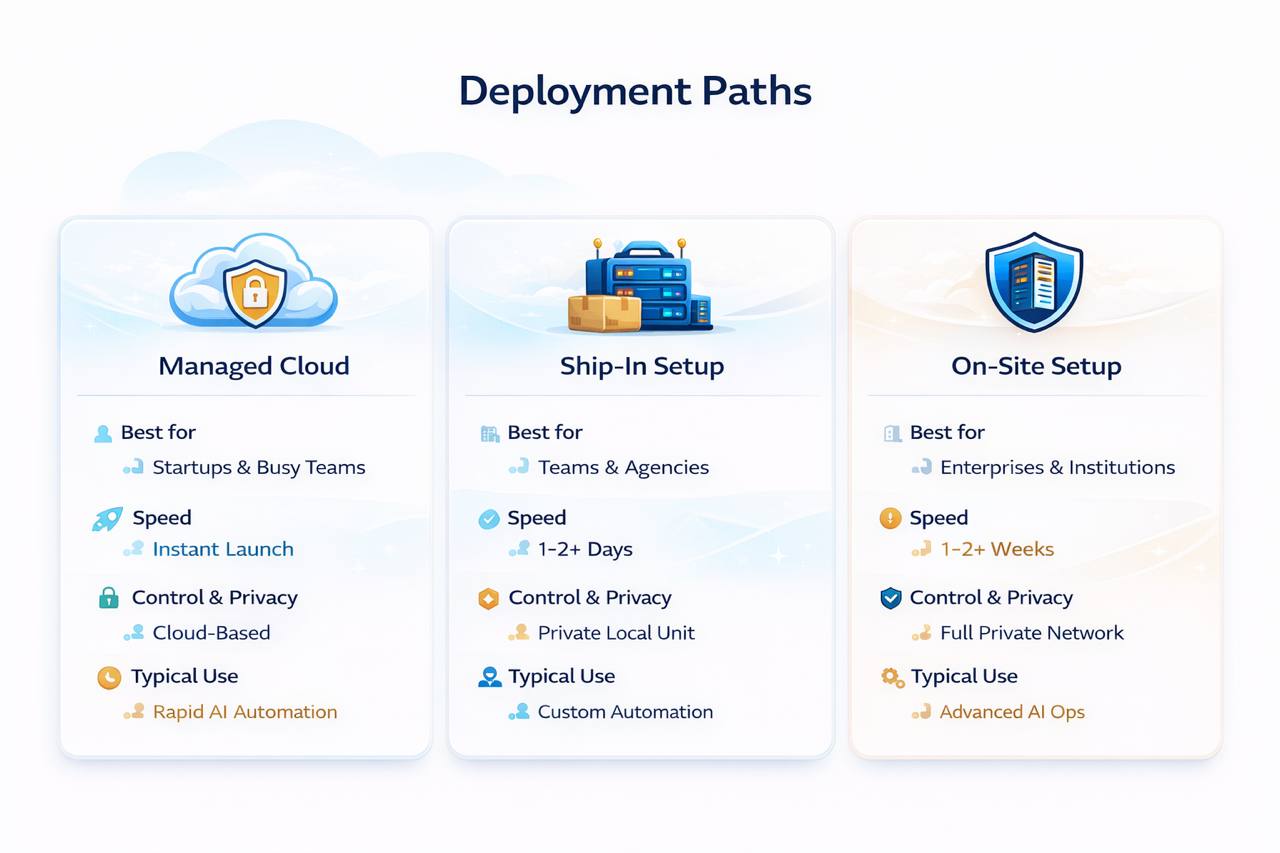
Start in cloud for speed. Move into ship-in or on-site only when the environment needs tighter control. Keep model usage separate so the base plan stays clean.
Launch fast Three cloud tiers for getting a live operator into production quickly.
Control when needed Ship-in and on-site stay available for hardware-heavy or private environments.
Usage scales separately Credits keep model consumption flexible instead of bloating the base plan.
Choose the right path first 
Cloud for speed. Ship-in or on-site when the environment says otherwise.
Keep implementation, hosting, and model usage separate so you can scale the right line item instead of paying for bundles you do not need.
Cloud first
Credits stay flexible
Install only when needed
Managed cloud
Fastest path to a live operator.
For most teams, this is the right starting point. Pick the amount of headroom you need now, then move up only when the workload actually earns it.
Monthly Annual 17% off
Starter launch
Starter
$29 /mo
Scale up whenever workload increases
Best for a first live assistant, early workflow volume, and proving a useful operator without overcommitting.
Start Starter- 2 vCPU / 2 GB RAM / 40 GB SSD
- 1 OpenClaw deployment
- Browser automation + integrations
- Telegram-first onboarding
Steady daily use
Best fit Pro
$49 /mo
Scale up whenever workload increases
For heavier messaging volume, multi-channel work, and teams that want a stable daily operator instead of a test environment.
Start Pro- 3 vCPU / 4 GB RAM / 80 GB SSD
- 1 OpenClaw deployment
- Priority support path
- Best fit for growth ops
Higher sustained load
Business
$89 /mo
Scale up whenever workload increases
Built for more persistent autonomous work, higher concurrency, and teams that need more headroom before moving into custom environments.
Start Business- 4 vCPU / 8 GB RAM / 160 GB SSD
- 1 OpenClaw deployment
- Dedicated support path
- Better fit for heavier workflow spikes
Implementation paths
Install for controlled environments.
Some deployments need hardware handling, tighter training, or a real on-site install. These options exist for those cases, not as default upsells.
Remote hardware setup
Ship-In Setup
$1,500 one-time
Ship your hardware to us. We configure, harden, test, and return it ready for deployment.
Book Ship-In Setup- Full configuration + testing
- Security hardening included
- 30 days post-launch support
- 5–10 business day turnaround
Save $1,500 vs. on-site implementation
White-glove rollout
On-Site Setup
$3,000 one-time
We come to your location, deploy the system directly, and train your team in the environment where it will actually run.
Book On-Site Setup- Professional on-site installation
- In-person training + walkthrough
- Security hardening included
- 30 days post-launch support
Travel and lodging billed separately
Volume discounted
Hourly Support Hours
$99 total
Remote troubleshooting, implementation help, review sessions, and system fixes. The more hours you commit, the lower the effective hourly rate.
- Remote troubleshooting and fixes
- AI model and workflow optimization
- Integration support
- Discounts up to 35% for larger hour blocks
OpenClaw Credits
Keep model usage flexible.
Credits are the usage layer. They let a deployment access model capacity without forcing provider setup on day one.
Model consumption reference
What credits cover.
Model Credits / 1K tokens 5K credits runs
Claude Sonnet 4.6 Default13 cr~385K tokens
Claude Opus 4.6 Premium62 cr~80K tokens
Claude Haiku 4.53 cr~1.7M tokens
GPT-5.18 cr~600K tokens
GPT-5.4 New15 cr~333K tokens
GPT-5.4 Pro Pro180 cr~28K tokens
DeepSeek V3 New2 cr~2.5M tokens
DeepSeek R1 Hot4 cr~1.25M tokens
Gemini Flash1 cr~5M tokens
Gemini 2.5 Pro New8 cr~625K tokens
Kimi K2.52 cr~2.5M tokens
Qwen Max New3 cr~1.7M tokens
MiniMax M2.52 cr~2.5M tokens
Grok 412 cr~415K tokens
Implementation support
Bring in help where it counts.
Use support hours for quick unblock work, a scoped engagement for a defined build, or a retainer when you need ongoing operating help.
Hourly sessions
$99starting rate
Screen share, SSH, or video call support for fixes, reviews, and implementation help. Volume discounts apply as the hour block increases.
Project-based implementation
Customscoped per deliverable
A fixed-scope engagement for automation builds, integrations, audits, migrations, or a defined operator rollout.
Send project inquiryMonthly retainer
$5,000per month
Ongoing AI systems support for teams that need strategic guidance, implementation capacity, and faster escalation.
Start retainerWebsite design & build
$2,500flat project fee
A conversion-oriented site build with design, copy, SEO, and deployment handled as one scoped deliverable.
Buy website package FAQ
Questions before launch.
These are the questions that usually come up before a team chooses a deployment path.
Not necessarily. You can use OpenClaw Credits and avoid managing provider accounts yourself, or bring your own keys later if your control requirements change.
Choose ship-in or on-site when the environment, security requirements, or rollout process requires more control than a managed cloud deployment gives you. For most buyers, cloud is still the fastest path to value.
Credits cover AI model usage inside the platform. That keeps access flexible across different providers and makes it easier to top up compute without changing the underlying deployment plan.
Next step
Pick the path first.
Start with the environment that fits the work. Add credits, services, or implementation help only when the rollout needs it.